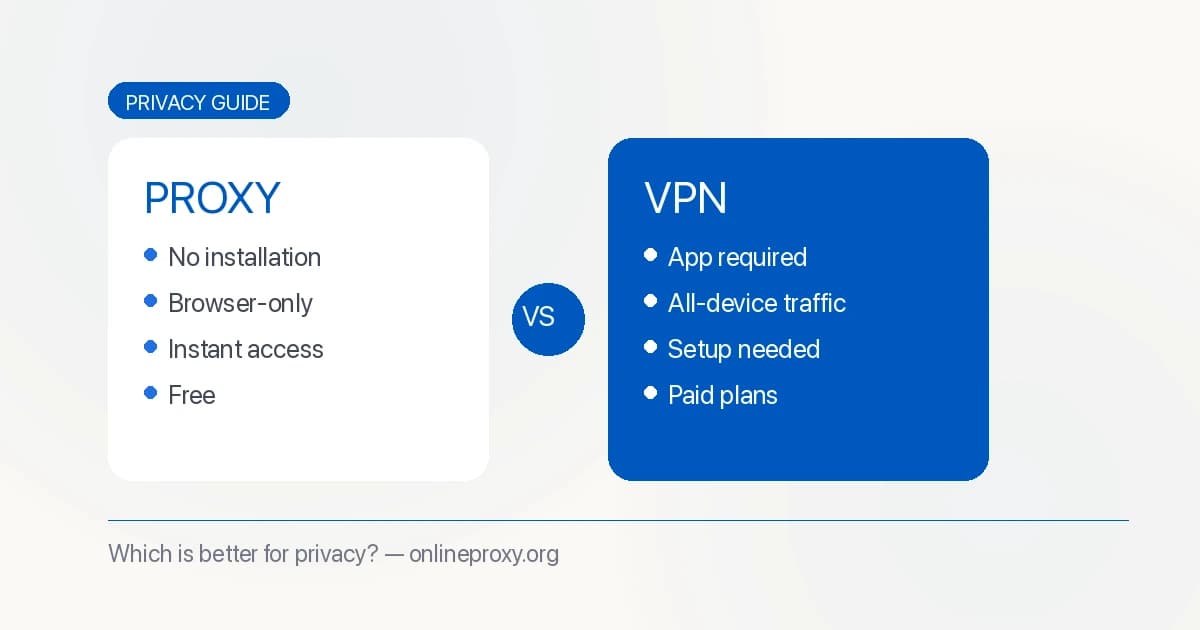
Quick Decision: Need to unblock a website right now from a browser? Use a proxy — it takes 10 seconds, costs nothing, and requires no installation. Need to protect all your device's traffic long-term, including apps? Use a VPN. Not sure which applies to you? Read the use case section below.
| Factor | Web Proxy | VPN |
|---|---|---|
| Setup time | Seconds | 5–20 minutes |
| Installation | None | Required |
| Traffic covered | Browser only | All apps and system traffic |
| Encryption | HTTPS to proxy | Dedicated tunnel (WireGuard/OpenVPN) |
| Hides from ISP | Partial (sites you visit, not that you used a proxy) | Yes (all traffic appears encrypted) |
| Cost | Free options available | Usually $5–15/month |
| Best for | Quick browser access | Long-term, all-device privacy |
Proxy and VPN are the two most common tools people use to protect their privacy online and bypass content restrictions. But they work very differently, and choosing the wrong one for your situation can leave you with inadequate protection — or unnecessary complexity for a simple need.
This guide cuts through the confusion. By the end, you'll know exactly when to use a proxy, when to use a VPN, and what neither tool can protect you against.
The Core Difference: What Gets Proxied
The most fundamental difference between a proxy and a VPN comes down to scope:
A web proxy (like OnlineProxy) only routes your browser traffic through its servers. When you use a proxy, only the web pages you visit in that browser tab are proxied. Your email client, mobile apps, game clients, other browsers, and system-level connections continue using your real IP address.
A VPN routes all network traffic from your device through an encrypted tunnel. Every app, every browser, every background process goes through the VPN server — your email client, your phone's app store, game clients, and everything else.
This single difference determines which tool is appropriate for most situations.
Privacy Comparison: What Each Tool Actually Protects
How a Web Proxy Protects Privacy
When you use a web proxy like OnlineProxy:
- The target website sees the proxy server's IP address, not yours
- Your ISP sees you connecting to OnlineProxy, but not which sites you visit through it
- Your school or employer's network sees traffic going to the proxy server, not the destination sites
- Other apps on your device are completely unaffected
What this protects against:
- Websites tracking your geographic location via IP address
- Basic network-level monitoring (network logs show "connected to proxy," not "visited TikTok")
- Targeted advertising based on IP-level location data
- Regional content blocks tied to your IP's country of origin
What this does NOT protect against:
- Login cookies, browser fingerprinting, and account-level tracking — websites still identify you if you're logged in
- Your ISP knowing you used a proxy (though not which sites you visited through it)
- Other apps on your device leaking your real IP
- The proxy operator itself — the proxy server can see your plaintext requests if it chooses to log them
Threat model example: You're at a school and want to watch YouTube without your school's network logs showing YouTube traffic. A proxy handles this. The network logs show traffic to the proxy server. Your school can't see you were watching YouTube.
Threat model failure: You're trying to protect your identity from a sophisticated adversary (e.g., law enforcement in a high-surveillance country) and believe a free proxy is sufficient. It isn't — the proxy operator is a third party you're trusting completely.
How a VPN Protects Privacy
When you use a VPN:
- All traffic from your device is encrypted before leaving your network
- Your ISP sees encrypted traffic going to the VPN server — and nothing more
- All websites and services see the VPN server's IP address, not yours
- This applies to every app on your device simultaneously
What this protects against:
- ISP-level traffic monitoring and logging
- Network-level surveillance on public Wi-Fi
- IP-based tracking across all apps and browsers simultaneously
- DNS leaks (a properly configured VPN handles DNS resolution internally)
What this does NOT protect against:
- Cookies, browser fingerprinting, and account-level tracking — same limitation as proxies
- The VPN provider itself — they can see your traffic if they log it (see logging policies below)
- Malware or phishing on sites you visit
- Device-level tracking (your device's hardware identifiers, telemetry, etc.)
Threat model example: You use public Wi-Fi frequently (cafes, airports, hotels) and want to prevent the network operator from monitoring your traffic. A VPN encrypts everything before it leaves your device, making your traffic opaque to the Wi-Fi operator.
Threat model failure: You believe a VPN makes you anonymous. It shifts trust to the VPN provider rather than eliminating the surveillance point. A VPN provider that keeps logs is just a different entity that can identify your traffic.
Logging Policies: What Gets Recorded
This is often the most overlooked part of the proxy vs. VPN decision.
What Proxy Operators Log
Web proxy operators typically have access to:
- Your IP address and the timestamp of your connection
- The URLs you access through the proxy (unless the proxy-to-site connection uses HTTPS end-to-end)
- Connection metadata (duration, data transferred)
Open-source proxies like OnlineProxy are more transparent about their logging practices because the code is publicly auditable. Reputable operators log minimal data and are explicit about their retention policy.
Practical risk: Most free proxy operators aren't storing logs specifically to harm users. The realistic risk is that a subpoena or data breach could expose connection logs. For general unblocking at school or work, this risk is academic. For activists or journalists in restrictive environments, it's meaningful.
What VPN Providers Log
VPN providers vary enormously in their logging practices:
- No-log VPNs (NordVPN, Mullvad, ProtonVPN) — claim and in some cases have been independently audited to not log user activity. Mullvad doesn't even require an email address to sign up.
- Minimal-log VPNs — log connection timestamps and aggregate bandwidth, but not destination URLs. Common among reputable commercial providers.
- Free VPNs — Many monetize by logging and selling user data. This is the fundamental business model issue with "free" VPNs that have no other revenue source.
Key question to ask: If a VPN provider received a court order, what data could they actually hand over? The answer depends on what they log, not what they claim.
Practical Logging Summary
For everyday unblocking at school or work, logging policies at reputable proxy services aren't a significant concern — you're not doing anything sensitive, and the realistic threat is your school's IT department, not a data breach from the proxy operator.
For sensitive use cases (journalists, activists, people in high-surveillance environments), evaluate the logging policy carefully for any tool you use — proxy or VPN.
Security Comparison
Proxy Security
A web proxy protects the connection between your browser and the proxy server using HTTPS. Once the proxy fetches content from the target site, security depends on whether that site also uses HTTPS.
OnlineProxy uses end-to-end HTTPS where possible:
- Browser → Proxy: encrypted (HTTPS)
- Proxy → Target site: encrypted if the site uses HTTPS (most modern sites do)
This is sufficient for general browsing. However, the proxy operator can theoretically see your browsing activity if they choose to intercept and log it — this is why using reputable, transparent proxies matters.
VPN Security
VPNs use dedicated encryption protocols — WireGuard (modern, fast), OpenVPN (established, audited), or IKEv2 — to create an encrypted tunnel covering all traffic. This is more comprehensive than HTTPS-only proxy encryption.
A well-configured VPN:
- Encrypts all traffic before it leaves your device
- Provides DNS leak protection (your DNS queries go through the VPN, not your ISP)
- May include a kill switch (stops all traffic if the VPN connection drops, preventing accidental IP exposure)
- Handles WebRTC leaks that can expose real IPs in browsers
The encryption difference matters most in adversarial environments (monitored public Wi-Fi, ISP-level surveillance). For typical school or workplace unblocking, the HTTPS encryption of a good proxy is functionally equivalent.
Speed and Performance
Both tools add latency since your traffic routes through an additional server.
Web proxy latency: Typically 50–200ms additional. In our testing of top proxies, OnlineProxy added ~90ms median — imperceptible for browsing and manageable for video. Page loads are fast because only your browser traffic routes through the proxy.
VPN latency: Similar range (50–200ms), though because all traffic routes through the VPN, the overhead affects every app simultaneously. High-bandwidth activities like gaming feel more impacted. Modern VPNs using WireGuard have reduced this significantly compared to older OpenVPN implementations.
For casual browsing and video watching from a browser, both perform well enough that you won't notice a meaningful difference.
Use Case Decision Tree
"I need to unblock a website on a computer I'm using right now" → Use a proxy. Takes 10 seconds. No installation.
"I need to unblock TikTok or YouTube in my mobile browser" → Use a proxy. Works in Safari and Chrome without any installation.
"I need the TikTok app or YouTube app to work on my phone" → Use a VPN. Apps use network connections that bypass browser-only proxies.
"I'm on public Wi-Fi and want protection for everything I do" → Use a VPN. Encrypts all traffic, including background processes.
"I'm a journalist or activist in a high-surveillance environment" → Use a reputable audited no-log VPN (Mullvad, ProtonVPN). And use it carefully.
"I travel frequently and want access to home-country streaming services" → A streaming-focused VPN (with rotating IPs) works better than a proxy for Netflix-style geo-enforcement. Free proxies rarely have the IP diversity to bypass streaming DRM.
"I want to check how a website appears from a different country, quickly" → A proxy with server location selection is faster and free for occasional testing.
"My school blocks the proxy site itself" → Check our list of tested alternative proxy sites for options your network may not have blocked yet.
"I use both TikTok in a browser and the YouTube app and want one solution" → Use a VPN. It covers both.
When to Choose a Web Proxy
A web proxy is the right choice when:
- You need quick, occasional access to a blocked site from a browser
- You're on a device you don't control (school lab, work laptop) where you can't install software
- You only need to unblock browser-based content, not native apps
- You want zero setup time and no registration
- You have a limited budget or want free access
Specific scenarios where a proxy is the practical choice:
- Accessing YouTube or TikTok from a school or work network in a browser
- Reading a news article blocked in your country
- Quick research through a restricted academic database
- Testing how a website appears from a different IP location
For step-by-step instructions on unblocking TikTok and YouTube specifically, see our complete TikTok and YouTube proxy guide.
When to Choose a VPN
A VPN is better when:
- You need to unblock native apps (not just websites) — e.g., the TikTok app, the YouTube app, or streaming apps
- You want always-on privacy across all your device's activity
- You use public Wi-Fi regularly and want comprehensive protection
- You handle sensitive information and need full-device encryption
- You need protection across multiple devices simultaneously
Specific scenarios where a VPN is the right tool:
- Streaming Netflix from a different country using their app
- Working remotely on a company network securely
- Regular use of public Wi-Fi (cafes, airports, hotels)
- Journalists or activists in high-surveillance environments
Can You Use Both?
Yes. Some users use a VPN for general privacy and switch to a web proxy for quick access to specific sites that conflict with their VPN (some sites block known VPN IP ranges). Using both simultaneously for the same traffic isn't recommended — it creates routing conflicts and usually slows your connection without adding meaningful benefit.
Frequently Asked Questions
Does a proxy hide my activity from my employer?
A proxy hides which specific sites you visit. Your employer's network logs will show connections to the proxy server, not to TikTok or YouTube. Depending on their monitoring sophistication, they may or may not investigate proxy usage. Always follow your company's acceptable use policy — this guide is informational, not advice to circumvent workplace policies.
Is a free proxy safe for logging into accounts?
Generally, no. Avoid entering passwords or personal information through a proxy you don't fully trust. Reputable proxies like OnlineProxy are more transparent than unknown free proxies, but the safest practice is to use proxies for reading publicly accessible content rather than authenticated sessions.
Does my school know I'm using a proxy?
Your school's network can see that traffic is going to a proxy server. They can't see what sites you're visiting through the proxy. Whether they care or investigate depends on their monitoring policies. Some school networks also use content filtering software that categorizes and blocks proxy services as a category — if the proxy URL itself is blocked, you'll see an error page rather than the proxy.
Can websites detect that I'm using a proxy?
Many websites use IP reputation services to detect and block known proxy IPs. OnlineProxy regularly rotates and adds server IPs to minimize this, but some sites — especially streaming services with strict geo-enforcement — may still block access. VPN IP ranges face the same issue; streaming services actively block both.
Which is better for Netflix?
Netflix actively blocks both VPN and proxy IP addresses at scale. Dedicated streaming VPNs (NordVPN, ExpressVPN) with large, frequently rotated IP pools have better success rates than free web proxies. For Netflix specifically, a paid streaming VPN is significantly more reliable. Free proxies rarely work.
What's the fastest free option for unblocking sites?
For browser-based unblocking, a Service Worker-based proxy like OnlineProxy is both the fastest to set up and performs well in practice (90–110ms additional latency in our testing). There's no registration, no installation, and no configuration. See our full comparison of tested proxy sites for benchmarks across multiple options.
Conclusion
The choice between a proxy and a VPN isn't about which is "better" — it's about which fits your actual situation.
For quick, browser-based access to blocked content, a web proxy like OnlineProxy is the fastest and simplest solution. Zero setup, zero cost, and capable of handling JavaScript-heavy sites like TikTok and YouTube through Service Worker technology.
For comprehensive, long-term privacy across all your devices and apps — especially if you need to protect native app traffic or use public Wi-Fi regularly — a reputable no-log VPN is the stronger choice.
Many users benefit from having both available: use the proxy for quick browser access, use the VPN when you need deeper protection across your whole device.
